I love the colour of the SSL bus compressor. That is the reason I reach for it. Getting the peaks under control is useful, but the part that interests me is how a little compression can make the sounds feel more connected.
In trance, you can have a kick, bass and lead that all sound good individually, yet the drop still feels like separate parts playing at the same time. A bus compressor can sometimes help those parts move together. When it works, the mix feels more cohesive without losing the impact that made it exciting.
It cannot rescue the wrong balance. I want the arrangement and levels working first, then I can judge what the compressor adds.
What this plug-in is modelled on
The version shown here is SSL Native Bus Compressor 2. It is SSL’s own plug-in based on the G-Series centre-section bus compressor: the stereo compressor associated with the mix bus of its large-format consoles.
This is the bus-compressor design, rather than the dynamics section of an SSL channel strip. Here I’m discussing it on the combined signal of a group or the master; it can also be used on an individual channel. Its VCA heritage is part of why it became associated with controlled, punchy mixes, but the way you set it matters more than the badge.
How it became an icon
The lineage goes back to SSL’s 4000 B console in 1976. The 4000 E followed in 1979, and later generations, including the G-Series, helped establish the SSL console sound in major studios. The centre-section compressor became a lasting part of that identity.
Its appeal survived the move away from large consoles. SSL also made standalone bus-compressor hardware, and software versions brought that style of processing into a DAW. The Native plug-in is a modern interpretation of that lineage, rather than a claim that your computer contains an entire vintage desk.
History and design background: SSL’s company history and SSL’s bus-compressor history.
What I mean by colour and cohesion
For me, colour here is about the feel of the compression. The attack controls how quickly gain reduction develops once the detector calls for compression. A slower attack can preserve more of a hit’s initial edge; it is not a fixed delay before compression starts. Release controls the recovery as the demand for compression falls. Together, those decisions shape the front edge, body and movement of the sound.
On a group, this is broad-band compression: when gain is reduced, the combined signal is turned down, rather than only the frequency that triggered it. The sounds share that gain movement. A loud clap can briefly pull down the supporting percussion along with it. That interaction can make them feel connected. It can also make them fight each other if the compressor is reacting too strongly to the wrong element.
That is the useful meaning of “glue”. It is not a special control that makes everything better. It is several sounds responding to one compressor, with timing that suits the music.
I also wouldn’t describe the colour as automatically adding tape warmth or heavy saturation. Compression character and harmonic distortion are different things. What I love is the sense of the mix taking on a more deliberate shape. I still need to compare it fairly to know whether that character helps this track.
Why it still belongs in a modern trance mix
Modern synths and samples can arrive very polished. That does not mean their envelopes already work together. A bus compressor still has a useful job when a drum group feels disconnected, a lead stack needs a little shared movement, or a nearly finished mix needs a subtle sense of cohesion.
There is a limit. If every layer is already heavily compressed, clipped or limited, another stage may just make the track smaller. I want a reason to use it, rather than an SSL permanently inserted because a master chain is supposed to have one.
How to read these settings
The screenshots show illustrative settings with the compressor actively applying gain reduction. A steady tone drives the meter so the amount is easy to see; these are not readings from a finished trance mix. Your music will produce different movement.
Threshold is shown at 0 on the plug-in’s scale, with makeup at 0 dB, for consistency. The threshold readout is not a promise of where your DAW’s peak meter will trigger compression. Set the threshold for the suggested amount of gain reduction on your own material, then adjust makeup to compare at a similar loudness. Copying the threshold number will not produce the same compression on another signal.
Release times are starting points too. At 140 BPM, a beat lasts about 429 ms and a sixteenth about 107 ms, but a 0.1-second release is not an exact sixteenth-note gate. Compressor recovery depends on its behaviour and the incoming signal. Listen to the groove rather than treating the control as tempo sync.
Master: a little cohesion without losing the drop
The slower attack lets gain reduction build more gradually, which can preserve more of the initial hit. I would start gently and listen through the drop: does it feel more connected while the kick still has its front edge? Auto is worth auditioning here, but it is not a promise that the recovery will suit every groove. Compare against bypass at a similar level. If the drop gets smaller, back off rather than adding makeup gain to disguise it.
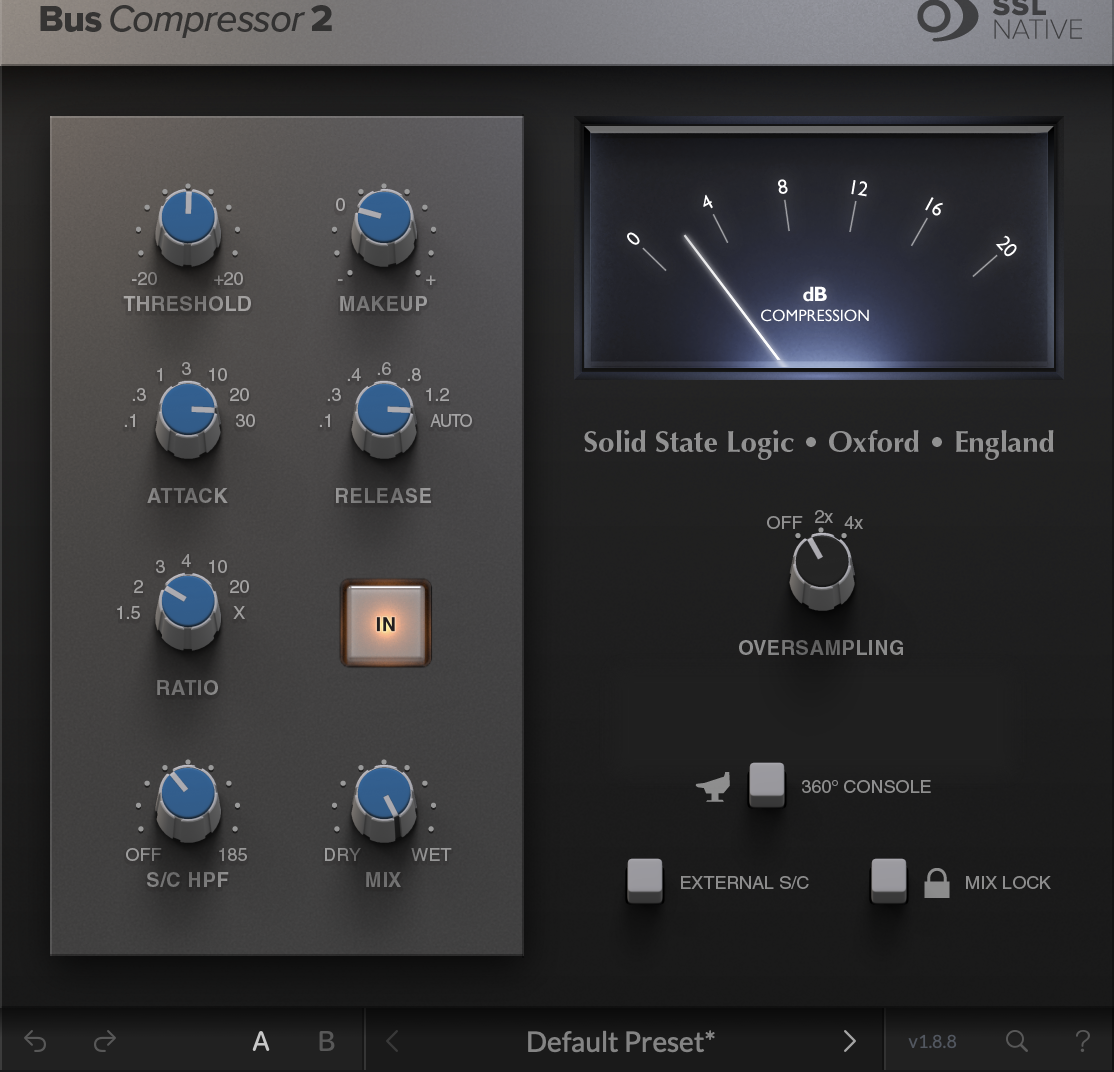
Start around 1–2 dB of gain reduction on the louder sections. Adjust threshold to suit the signal. Meter shown at approximately 2 dB of gain reduction.
Drum group: make the hits feel like one kit
A drum group is a useful place to hear the SSL character. The hits share one gain envelope, so the kick, clap and supporting percussion can feel more connected. Listen for whether the clap still has impact and the hats remain comfortable. If the kick makes every other sound duck too obviously, try less gain reduction or adjust the detector filter. A filter cannot guarantee that the kick stops driving the compressor.
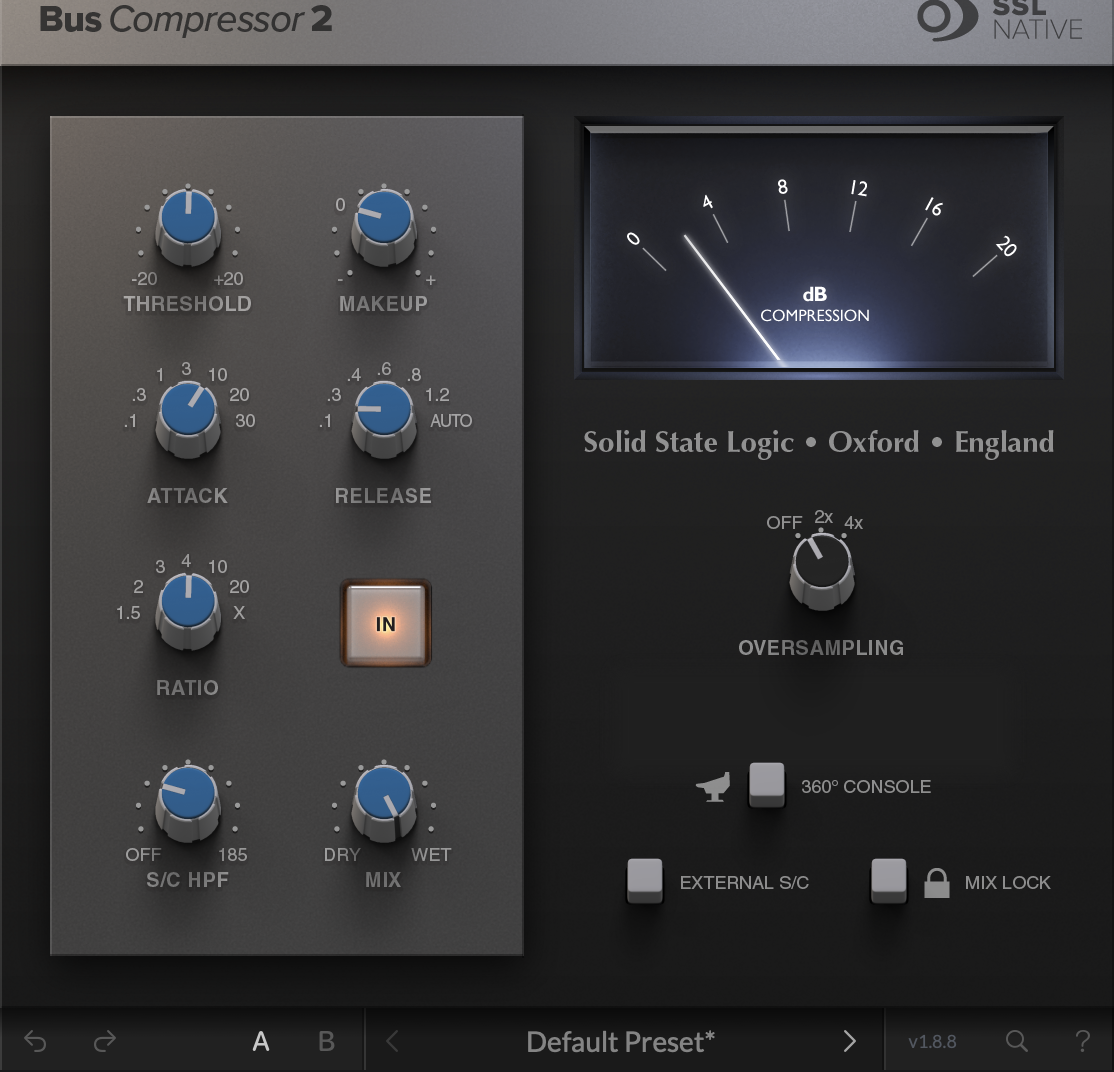
Audition roughly 1–3 dB of gain reduction on the main hits. Adjust threshold to suit the signal. Meter shown at approximately 2 dB of gain reduction.
Percussion group: tighten the movement
For a percussion group that feels disconnected, a quicker attack is worth auditioning. It can pull the sharpest accents into the same movement, but it can also blunt the pattern. Listen to the groove against the kick. If the little rhythmic details disappear, slow the attack or reduce the compression. More uniform level is not automatically a better groove.
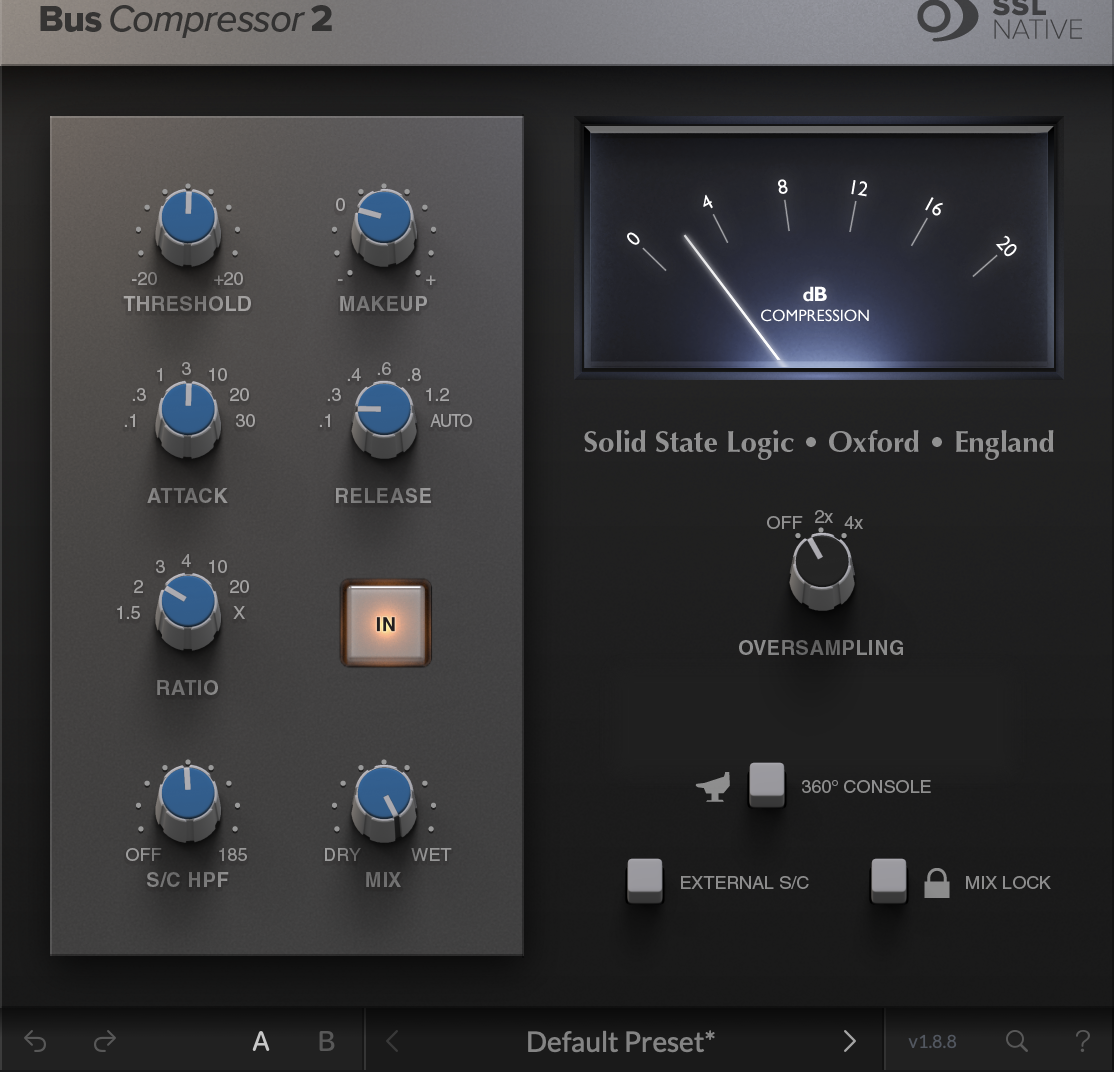
Try 1–2 dB of gain reduction on the accents. Adjust threshold to suit the signal. Meter shown at approximately 2 dB of gain reduction.
Lead layers: let a stack breathe together
When several lead layers already work together, a little shared compression can help the stack feel like one part. It does not fix masking or badly balanced patches. Listen to the phrase endings and the space between notes. If a bright attack pulls the whole stack down or the lead stays pinned back, reconsider the threshold and recovery. Sometimes correcting one layer works better than compressing the group.
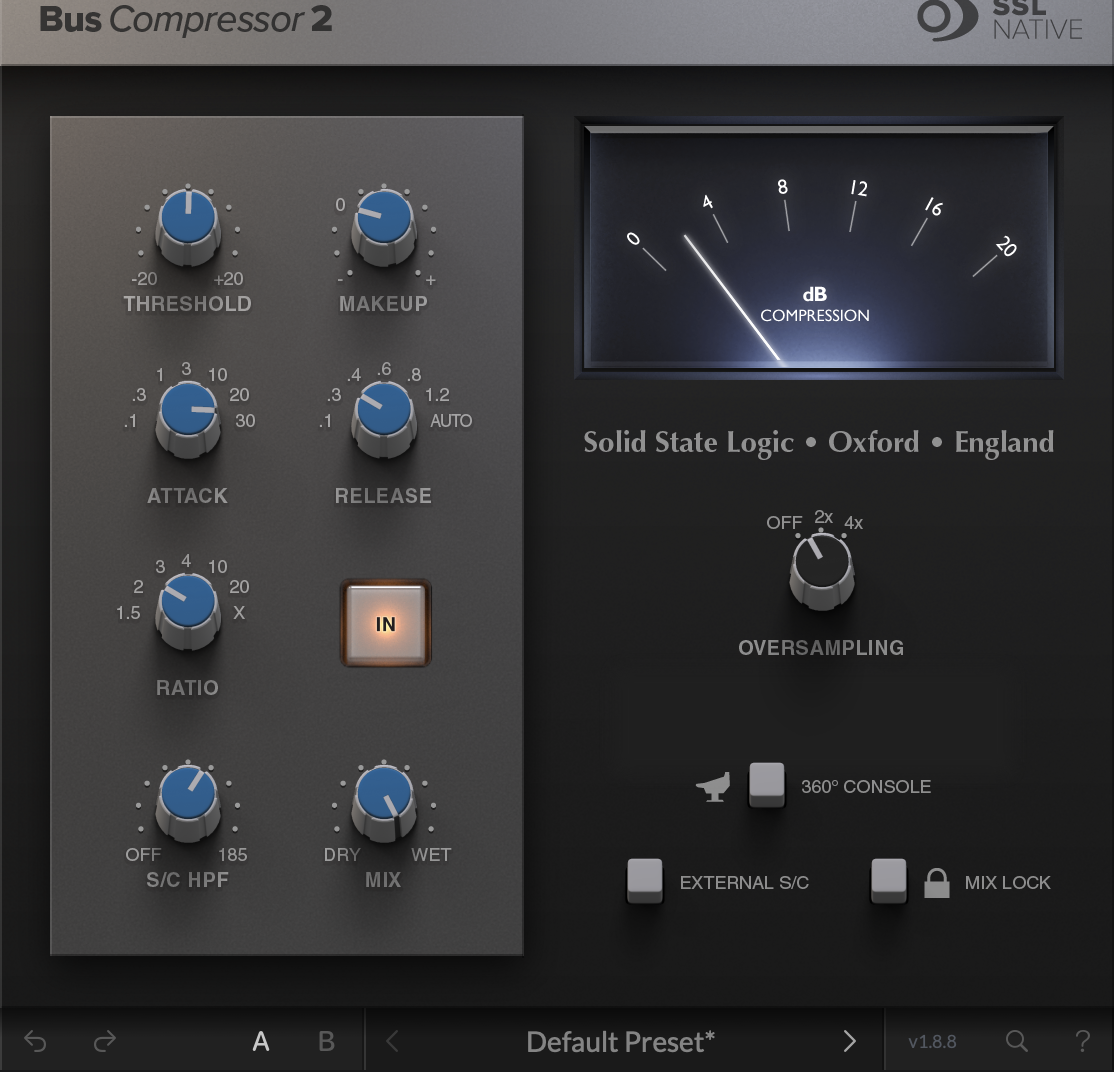
Start with around 1–2 dB of gain reduction on the fuller phrases. Adjust threshold to suit the signal. Meter shown at approximately 2 dB of gain reduction.
Bass group: control the combined weight carefully
On a layered bass group, shared compression can steady the combined part. But a sub-heavy note can turn down the mid-bass along with it. The sidechain high-pass filter reduces low-frequency influence on detection; it does not remove bass from the audio. Check the bass line with the kick and any existing ducking active. Avoid stacking another recovery curve on top unless the groove actually benefits.
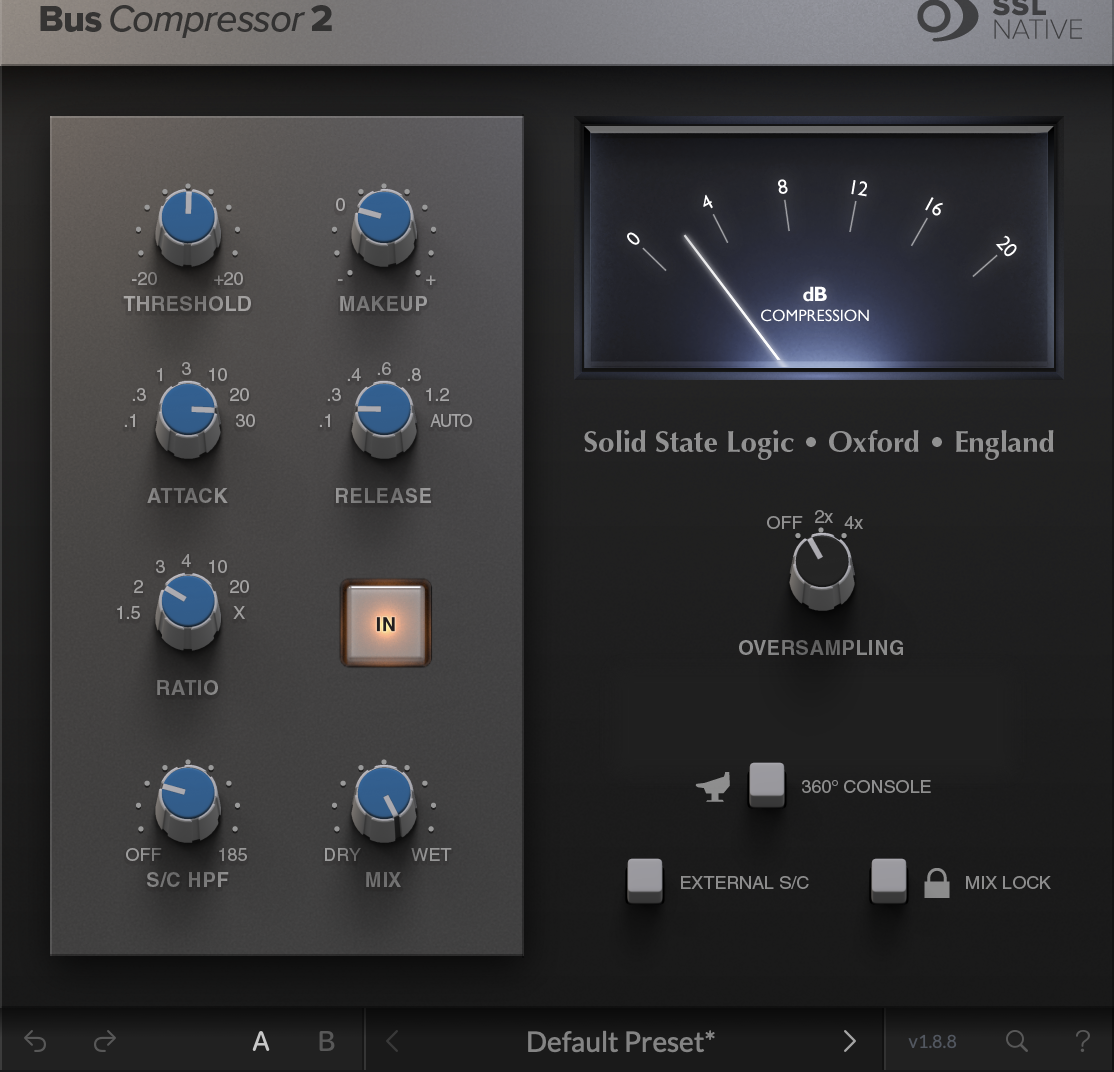
Try around 1–2 dB of gain reduction, watching which notes trigger it. Adjust threshold to suit the signal. Meter shown at approximately 2 dB of gain reduction.
Parallel drums: more body, with the original still present
This is an optional colour experiment, not my gentle master setting. A more compressed drum signal blended under the original can bring forward body and sustain while retaining some dry attack. It can also exaggerate hats and room tails. The 30% mix is only a starting point. Match the combined output level, and keep the blend only if it adds useful weight rather than constant density.
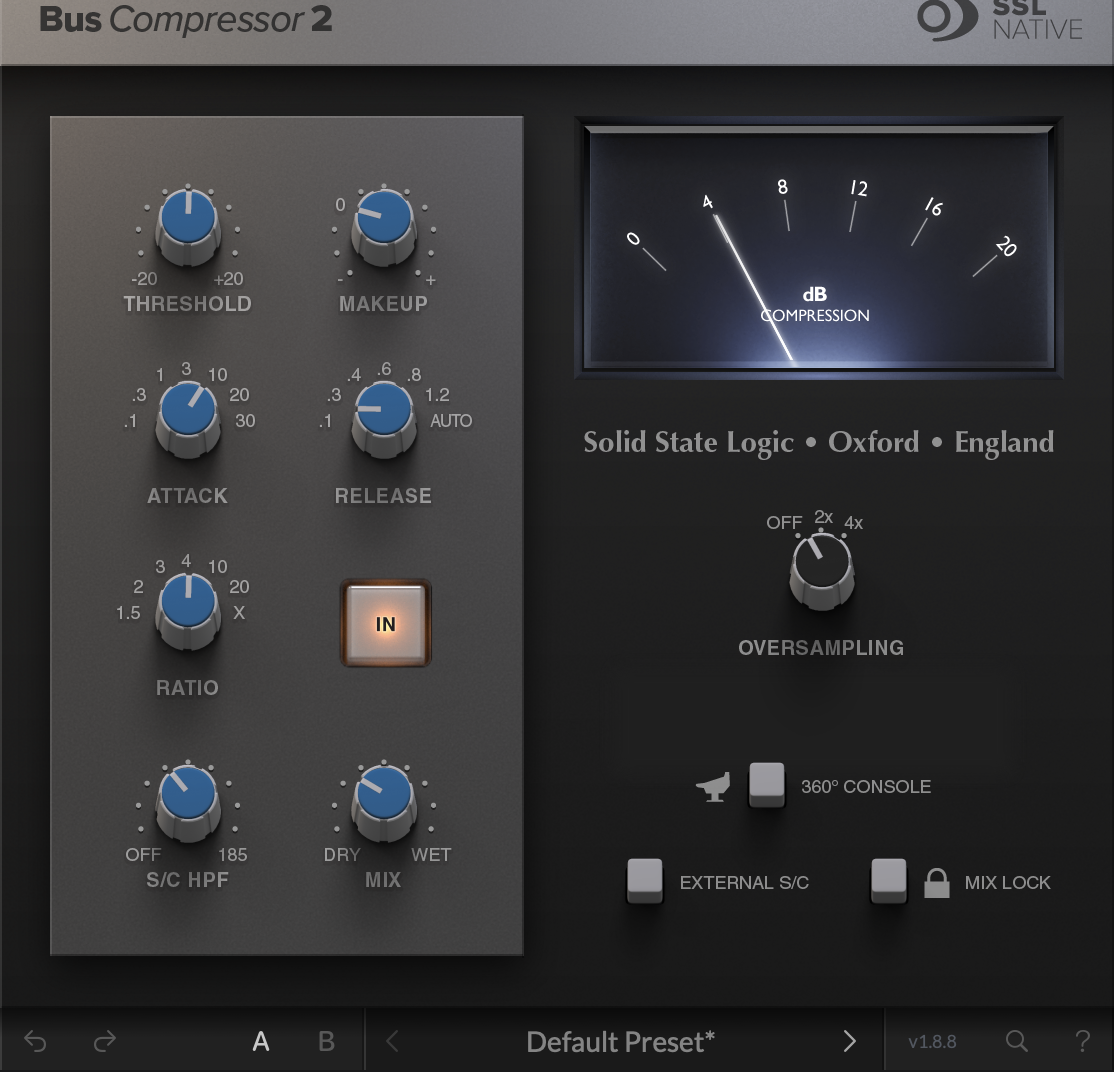
As a separate experiment, audition 3–6 dB of gain reduction in the compressed path before blending. Adjust threshold to suit the signal. Meter shown at approximately 4 dB of gain reduction in the compressed path, before the wet/dry blend.
For the underlying controls, see the compressor guide. If one frequency keeps triggering the problem, the dynamic EQ guide explains a more selective approach.
The sidechain filter matters in trance
The kick and sub can dominate the detector, making the whole bus dip each time the low end hits. The sidechain high-pass filter reduces their influence on the detector. It does not high-pass the audio you hear, and it does not make the compressor ignore the kick completely.
Too much filtering can create the opposite problem: the low end passes with less control while brighter elements drive the compression. Use the filter to choose what should influence the movement, not to make the meter look calmer.
Where I would be careful
A very fast attack can flatten the front edge of the kick or clap. A release that stays down too long can hold back the next hit. A recovery that feels too abrupt can make the bus pump in an unhelpful way. Those are listening decisions, not reasons to ban any particular setting.
Also check how much compression you have already used. Channels into groups into a compressed master can become a lot of gain movement. If the track loses depth or the drop stops lifting, bypass the stages one at a time and find out where it happens.
The plug-in adds useful options beyond the classic controls, including a wet/dry mix, sidechain filtering and oversampling. SSL advises auditioning oversampling when heavy compression introduces unwanted distortion. It is an option to evaluate, not a guarantee of better sound. The examples leave it off so the settings are easy to compare.
For a different finishing colour, read my Mäag EQ4 review. For a supporting bass layer before you reach for group processing, see the Korg Polysix review.
Keep the reason behind the setting
This is the approach behind Mix Lock: understand what you want to hear, make a deliberate move, and judge it in the track. Its channel guidance helps you work through mixing decisions without handing those decisions over to an automatic mix.
Try the Mix Lock desktop app free for 72 hours to explore the guidance. The SSL plug-in is a separate purchase; the demo includes the Mix Lock app, while the Ableton template and live bridge come with the paid bundle.
My take
I love the SSL bus compressor for its colour: that feeling of separate sounds becoming a more connected performance. On the master I want it gently shaping the finished balance. On groups I can give it a more specific job and hear whether the shared movement helps.
The history explains why it is iconic. What keeps it relevant is whether its character makes the track feel better today. Match the level, keep the punch, and don’t mistake a bus that is working harder for a mix that is working better.
Control descriptions and plug-in design: SSL Bus Compressor 2 user guide. Example settings and listening suggestions are editorial starting points, not measured results or a hardware comparison. SSL Native Bus Compressor 2 is a separate third-party product and is not included with Mix Lock.