I love the Mäag EQ4 as a colour EQ, particularly towards the end of a mix. Sometimes the balance is there, nothing obvious needs fixing, but the track still feels slightly closed in. A small Air Band lift can be the finishing touch I’m looking for.
That is why I like it in mastering. I’m not trying to rebuild the mix at that point. I want to hear whether a subtle tonal change helps the whole track feel more open.
My moves are small: 1–2 dB of boost or cut at most. That is how I use this EQ, rather than a rule about what everyone else should do.
The Air Band is why I reach for it
I usually favour 40 kHz, sometimes 20 kHz, and rarely 10 kHz. For what I want from it, the higher settings tend to give me the gentler lift I’m after.
The 40 kHz label can seem odd. We cannot hear that high, but the Air Band is a broad shelf, not a boost confined to one frequency. Its slope reaches into the audible top end. That is the part you hear.
Moving the selection down towards 10 kHz brings more of the lift into the audible treble. The EQ4 manual describes the higher selections as producing a smoother high end. That fits the way I like to use it.
On a lead: a little openness
A lead can have plenty of presence and still benefit from a touch of air. I’m listening for whether the melody opens up in the full arrangement, without the upper harmonics getting scratchy.
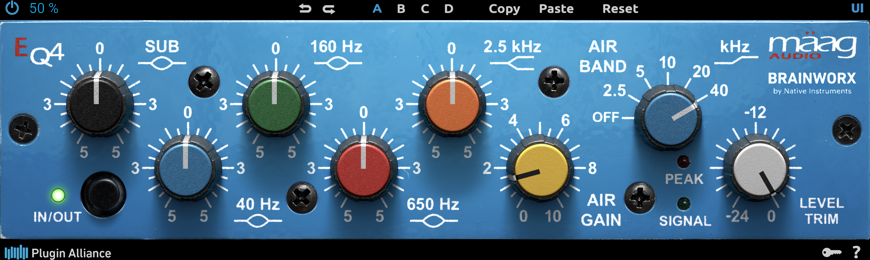
Try the lift with the hats playing. If the supersaw was already sharp, extra top end can make the whole drop harder to listen to. In that case I would leave the air alone and revisit the sound.
On a pluck: keep the attack in check
A little lift can bring out a pluck’s upper detail, but its attack needs attention too. The brighter version might sound more exciting on its own and then poke out too much once the rest of the track comes back in.
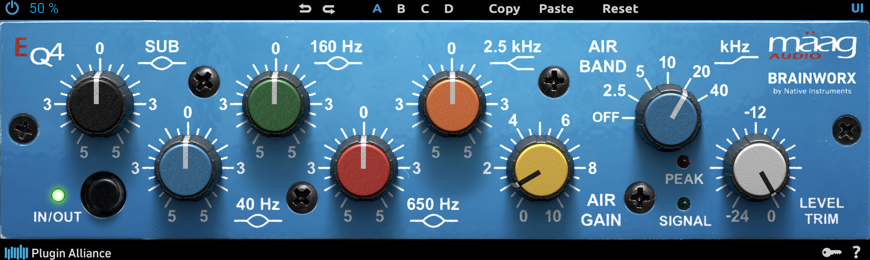
This is somewhere I might audition 20 kHz. I would still compare it with 40 kHz and bypass, listening to the pluck against the lead rather than deciding in solo. The useful amount depends on what the patch already has.
Why I love it in mastering
There is something satisfying about making a tiny adjustment and hearing the whole mix open up. That is the appeal of the EQ4 for me. I don’t need a dramatic before-and-after.
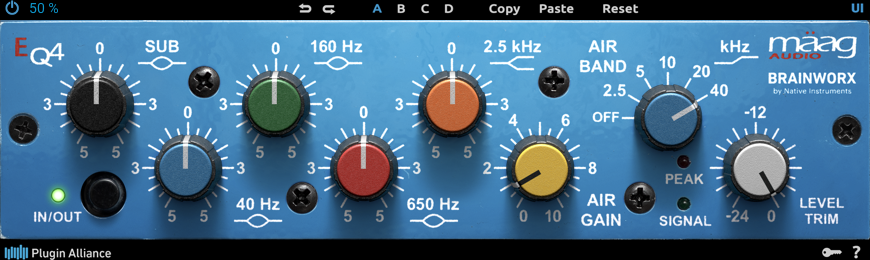
On the master, that change reaches everything. Does the lead feel more open? Do the hats still sit comfortably? I check the busiest drop before keeping it. If the mix already has enough top end, I leave it alone.
Match the output level before deciding. Boosting the EQ4 can also raise its overall gain, and Level Trim is there to compensate. A slightly louder version can win the comparison before you have properly judged the tone. The right trim amount depends on the material; it is not automatically the opposite of your Air Gain setting.
More ways to use the other bands
There is more here than the Air Band. These are small tonal experiments for specific symptoms, not a processing checklist. You do not need an EQ4 on every channel. Start with bypass and try one adjustment at a time.
Kick: a little more weight
If the kick feels slightly light, audition a 1 dB lift at 40 Hz. Check whether the extra weight helps its place against the sub. A kick whose useful body sits higher may gain little beyond headroom loss from this move. Leave the Sub band alone for this example; extra very-low energy is not automatically useful punch.
Mid-bass: body without as much boxiness
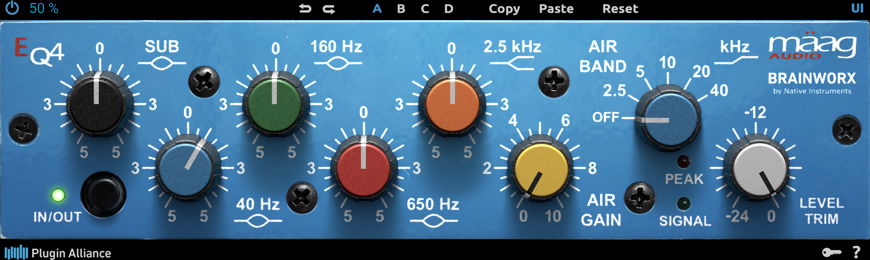
On a thin but boxy mid-bass layer, audition a little body at 160 Hz and a small reduction at 650 Hz. Try each move separately before combining them. Check the rolling groove with the kick and sub: the 160 Hz lift can crowd their upper harmonics, while the 650 Hz cut can remove useful character if the layer was already lean.
Pad: less low-mid weight, a touch of air
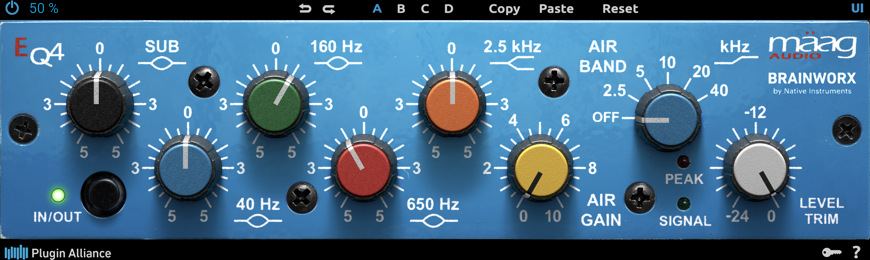
A supporting pad may need less low-mid weight rather than more level. Audition a 1 dB cut at 160 Hz first. If the pad then needs some upper openness, try a separate 1 dB Air Band lift at 40 kHz. Listen behind the lead. Keep either move only if it helps; an airy pad can still mask the melody.
Clap or percussion: ease an over-forward edge
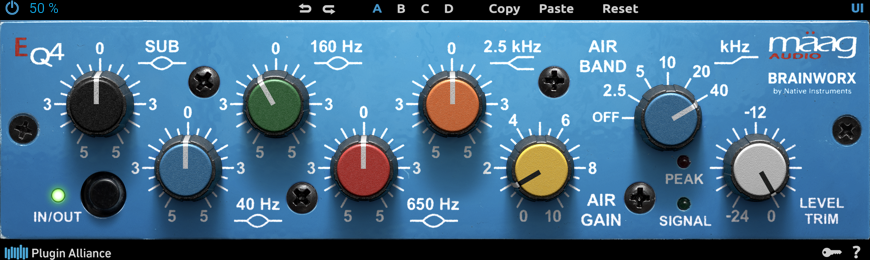
For a clap or percussion hit that pushes too far forward, audition a 1 dB reduction at 2.5 kHz. This is a broad tonal move, so check that you have not lost the attack that gives the groove its shape. If only a narrow ringing frequency is the problem, a more precise EQ is a better tool. The Air Band stays off here.
Vocal: openness without chasing every consonant
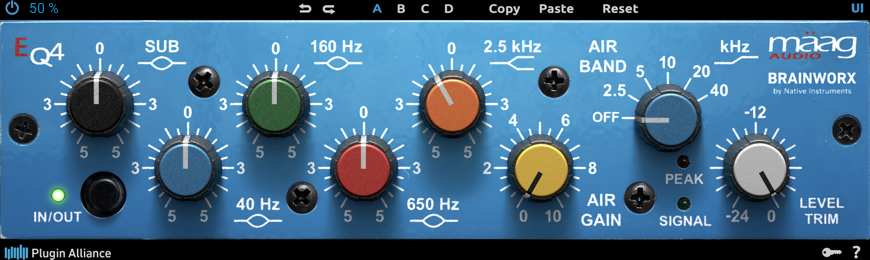
On a vocal that feels slightly closed in, audition a 1 dB Air Band lift at 40 kHz. Check the consonants and breaths with the track playing. This shelf also lifts existing hiss and sibilance; it cannot separate desirable air from an abrasive S. Deal with those problems at the source or with suitable corrective processing rather than adding more air.
Groups deserve caution
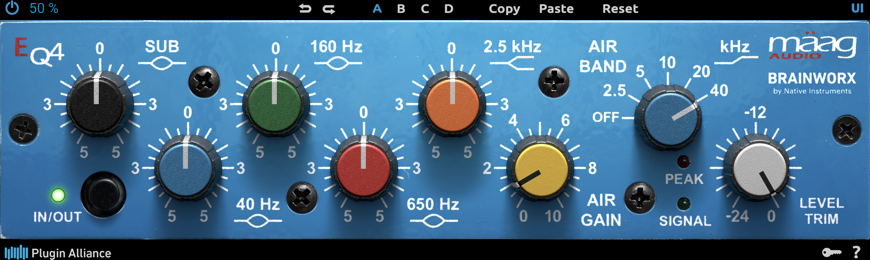
If one lead needs air, I would rather treat that lead first. Putting the EQ across a synth group also brightens the supporting layers, including sounds that were already sitting well.
Watch what is happening earlier in the chain, too. A little air on individual channels, more on their group, then another lift on the master can add up to a brittle mix. Each move can seem modest when you judge it separately.
Smooth does not mean impossible to overdo
The Air Band can sound smooth and still give you too much treble. Even at 40 kHz, a heavy boost changes the audible range. The higher setting is not protection against harshness.
On an already bright trance mix, too much can exaggerate the abrasive harmonics in a lead or make the hats feel relentless. Moving down to 10 kHz can make that brightening more direct. It won’t inevitably sound harsh, but it is easier to get more treble than I was looking for.
That is why I keep my adjustments within 1–2 dB. If I want considerably more, I stop and ask what I’m trying to change. Someone else’s large boost might suit their source; it does not tell me what mine needs.
My take
I love the Mäag EQ4 as a finishing colour EQ, especially in mastering. A restrained Air Band lift can give me that last bit of openness when the mix is already close.
Usually 40 kHz, sometimes 20 kHz, rarely 10 kHz. Small moves, a fair bypass comparison, and enough restraint to leave it alone when the track already sounds right.
The screenshots show the actual plug-in editor in a separate host. These are illustrative settings for auditioning, not measured improvements or presets from a customer track. No audio comparison is presented. Mäag EQ4 is a separate third-party product and is not included with Mix Lock.
Technical reference: official EQ4 manual. Product information.