MIX LOCK · PEAK-TIME TRANCE EDITION
What is Mix Lock?
Mix Lock is a desktop teaching app for peak-time trance producers. It explains how to balance your channels, understand processing and work through mix problems. The paid bundle includes an Ableton Live template, a live Ableton link and the Trance Sub synth. You listen, choose and make the changes.
Who is it for?
Mix Lock is built for intermediate to experienced producers making peak-time trance. You can already write a track, but want to understand why the low end gets crowded, a lead disappears or a group stops feeling punchy.
The guidance follows the roles inside a trance production: kick, sub, bass layers, drums, leads, plucks, pads, acid, vocals, effects, returns and master. The app teaches these through 45 channel guides. They describe musical roles and grouped coverage, rather than one guide for every physical track.
Start with a real problem: kick and sub clashing or a lead getting lost in a busy mix. Those free guides show the kind of decisions Mix Lock helps you understand.
How does it work alongside Ableton?
- Open the template and build your track. The labelled channels, routing and pre-mapped racks give you an organised starting point. Bring your own sounds.
- Consult the relevant channel guide. Read what a control does, what to listen for and why a starting point might need changing in your track.
- Use the live link for context. The included bridge reads macro positions, device settings and meters from Ableton. Turn the controls in Ableton; Mix Lock follows those values.
- Keep the next decision manageable. Use the diagnosis guidance and Fix Queue to record what needs attention. Use the Scorecard on a bounced mix to investigate level and balance measurements alongside your listening.
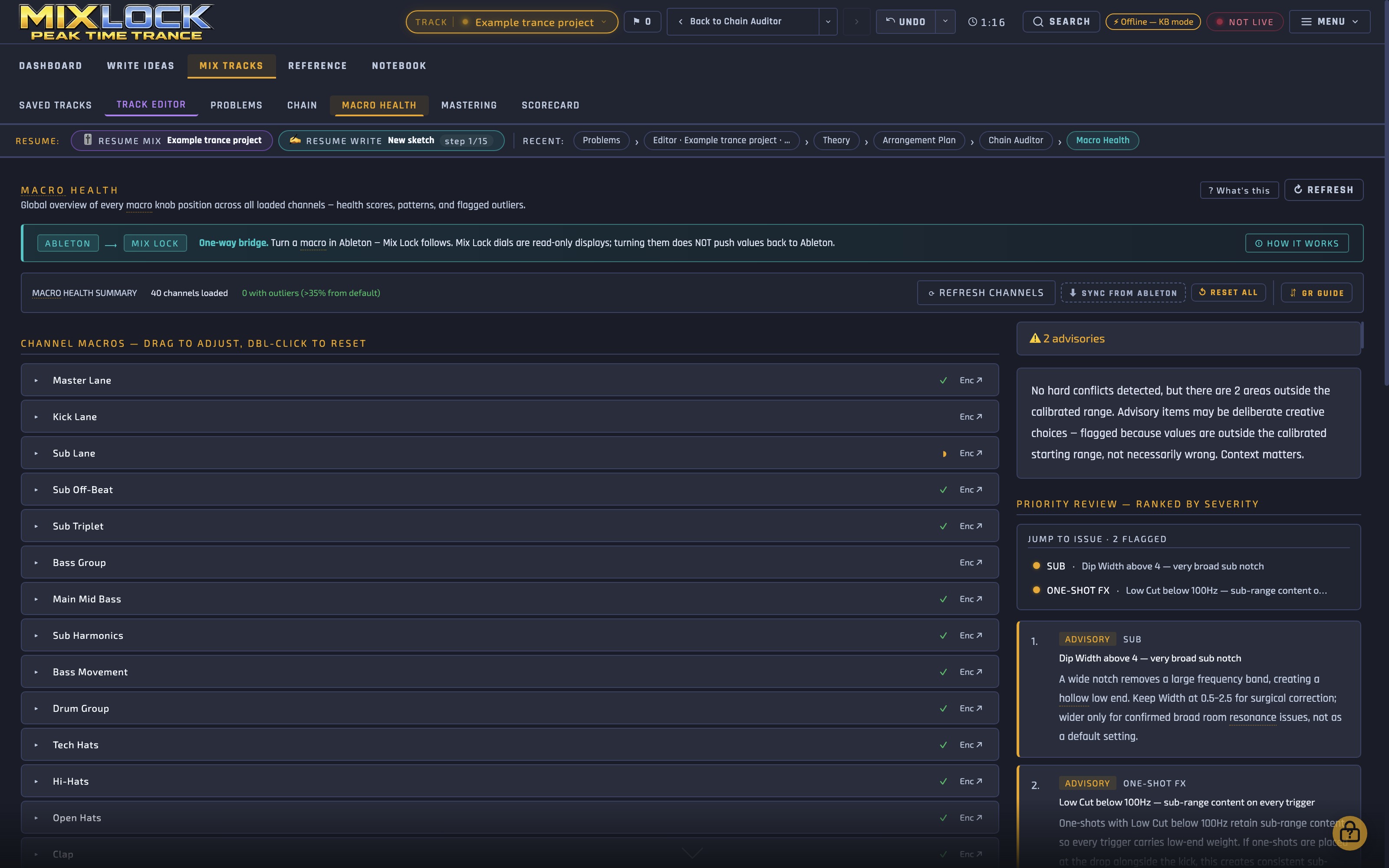
Mix Lock runs in its own window. The main app is a mixing reference, rather than an audio effect inserted on a channel. Its Scorecard measures a bounce locally on your computer; it does not change that audio. The live bridge reads your session; it does not adjust your mix for you.
What do you get with the paid licence?
- The Mix Lock desktop app for macOS and Windows, with channel guidance, mix stages, theory, diagnosis, Fix Queue, Scorecard and production references.
- A 41-track Ableton Live template with 6 return tracks, set to 140 BPM, with organised routing and pre-mapped racks.
- The MixlockBridge live link for reading the Ableton session while you work.
- Trance Sub, the included sub-bass synth, unlocked with your Mix Lock licence key. VST3 on Mac and Windows, plus AU on Mac.
See the current price and buy Mix Lock. The paid product is a lifetime licence.
Plug-ins covered in our plug-in reviews, including Korg Polysix, Mäag EQ4 and SSL Native Bus Compressor 2, are separate third-party products. They are not included with Mix Lock or its demo, and you do not need those reviewed plug-ins to use Mix Lock.
What do you need to run it?
- Mac: macOS 12 Monterey or later. The app supports Apple Silicon and Intel.
- Windows: Windows 10 or later, 64-bit.
- For the supplied template: Ableton Live 11.3 or later. The canonical template uses Suite devices, including Wavetable and Echo, so use Live Suite for the supplied device chains.
- Template ducking: install the free Caelum Audio Flux Mini 2 plug-in separately.
Can you use it with another DAW?
You can consult the app’s mixing explanations and references while working in another DAW. The supplied template and live bridge are for Ableton. Other DAWs do not get that same ready-mapped session or live connection.
Do you need an AI subscription?
No. The built-in reference and offline assistant work without an external AI key. Optional online assistant answers use your own Google Gemini API key; that service is separate from the Mix Lock licence.
See FAQ and setup help for licensing and installation questions.
What is in the free demo?
The free 72-hour demo previews the desktop app. It does not include the Ableton template, live bridge, Trance Sub or saving. No payment card is required.
Use it to explore how the guidance is written and whether that way of working suits you. The free website guides are another way to start: try the Compressor guide, Glue Compressor guide or dynamic EQ guide.
Read why Paul built Mix Lock, explore all free guides and tools, or watch the product walkthroughs.