Mix Lock 1.3 · 4 October 2026
What's new in Mix Lock 1.3
Out now · Free update for owners · macOS 12 or later and Windows 10/11 (64-bit)
Mix Lock still does one job: it teaches you why your mix works or doesn't, channel by channel, so you make the call in Ableton. 1.3 makes that faster to get to, closer to your actual session and easier to live with. It still won't mix for you.
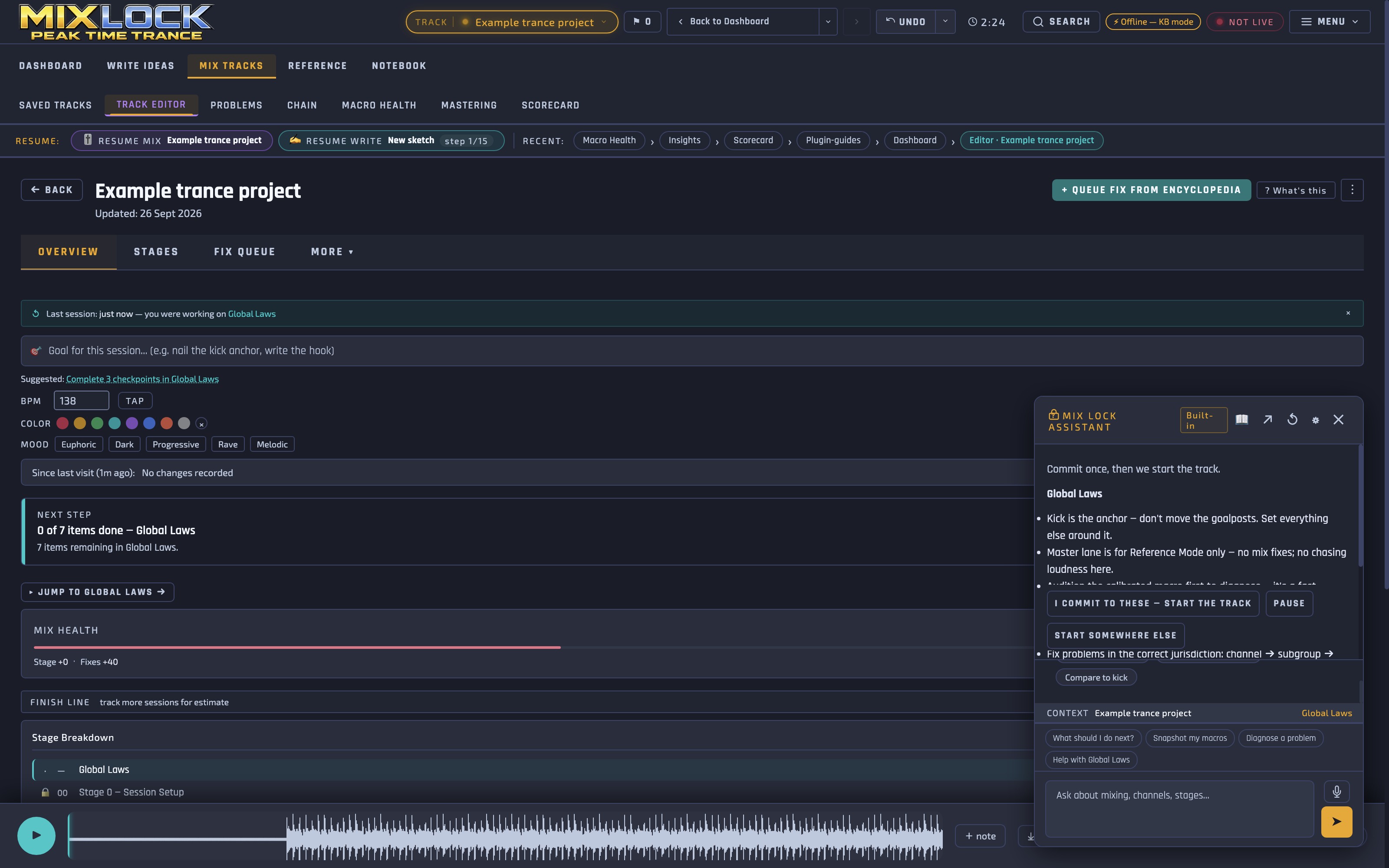
Guide me, in the assistant
Two new ways in, and both work offline.
- Diagnose: describe what's bothering you, like a kick that vanishes in the drop. Guide me takes you to the channel involved and explains what your settings there are doing, so you know where to look and why.
- Walk: it takes your track through the method stage by stage, bringing up your Fix Queue items as you reach them.
It points; you decide. Nothing gets ticked unless you tick it. Want free-form answers as well? Add your own free Google Gemini key for the optional online mode.
A smarter live link to Ableton
- The bridge finds your Mix Lock rack wherever it sits on a channel, so moving devices around doesn't break the link.
- Duplicate and same-named tracks are handled, so layered leads and copied channels read correctly.
- Dials show the same values and units Ableton shows, so what you read in Mix Lock matches what you see in Live.
- The bridge now lives in your Ableton User Library, and Mix Lock offers to update it when a new version is out.
It still only reads. Every move happens in Ableton, by you.
Arrangement guidance that follows your track
Single-drop and evolving arrangements are valid choices, not mistakes. Genre conventions now arrive as things to listen for, not warnings, and the guidance follows the track you're actually making.
A faster, more careful Scorecard
- About twice as fast on a whole track.
- Save a copy of a read when it's worth keeping.
- No kick-versus-bass verdict on a section that has no kick in it.
- No more guessing your sub's tuning from a full mix, where the sub can't be picked out reliably.
It still measures rather than listens. Your ears make the call.
Easier to read, your way
Four interface styles plus the Theme Builder, easier-to-read text throughout, and full keyboard access.
Harder to lose work
If a save fails, Mix Lock tells you. The newer copy wins when you relaunch, and quitting or updating saves first.
Trance Sub, included
Trance Sub, Mix Lock's sub-bass synth, is included with every Mix Lock licence. It's in the 1.3 download, in its own folder: install it, open it in your DAW and unlock it with your Mix Lock licence key. AU and VST3 on Mac (macOS 12 or later), VST3 on Windows. Trance Sub goes on general sale on its own from 10 October, at a £14 launch price.
Also in 1.3
- A refreshed V1.3 Ableton template.
- A 56-page illustrated user manual, included.
- The 12-month install limit is gone.
- Rebuilt on a current, more secure foundation, signed and notarised by Apple on the Mac.
Getting 1.3
Own Mix Lock? Mix Lock offers the update in the app. Your licence key carries over, and your tracks, ideas, fixes and notebook stay put. On a Mac, 1.3 needs macOS 12 or later; if yours can't run it, the version you have keeps working.
Buying now? You get Mix Lock 1.3, the V1.3 template, the bridge, the manual and Trance Sub. See pricing →
Trying it first? The free demo is the full app for 72 hours, in 60-minute sessions, with all 43 channel guides unlocked. It activates itself the first time you open it, and everyone gets a fresh 72 hours on 1.3, even if you tried an earlier version. The demo doesn't save, and the template, bridge and Trance Sub come with the paid licence. Get the demo →
Earlier releases are listed in the version history. System requirements are on the pricing section and in the FAQ.