The short answer
In a classic off-beat trance bassline the sub plays between the kicks, so clashes usually come from overlap. At 140 BPM the off-beat arrives about 214 ms after each kick. Keep the kick's audible tail short enough to leave that gap, with around 150–200 ms as a good starting point. Get the sub's notes and octave right at the source, sidechain the sub to the kick, and check the sub isn't too loud before adding an EQ cut. Then fine-tune the balance by ear against a reference track.
Why the kick and sub decide the drop
Take a peak-time drop back to its bare bones and you're left with a four-on-the-floor kick and a bassline underneath. Everything else, from the lead to the supersaws, sits on top of that. If those two aren't working together, fixing things further up the mix won't save it.
The usual sign is a loop you can't get out of. You turn the kick up and the sub goes missing, then bring the sub back and the kick loses its punch. Level alone may not solve it. Check the notes and the timing as well as the levels. Where the two sound at the same time, their waves can also partly cancel each other out, which is a phase problem.
It matters more here than anywhere else because of where the track gets played. A club system shows up low-end problems that smaller speakers hide, and most club systems play the bass in mono. A clash you can barely pick out at home can turn into a hole or a boom on a big system.
Where the clash actually happens
In a straight off-beat pattern the sub plays between the kicks. That means the first thing to look for is overlap, where one sound is still playing when the other starts. That might be the kick's tail still ringing when the sub note begins, a sub note that carries on into the next kick, or a sub note that slides up or down in pitch just as the kick hits. Rolling basslines fill more of the beat, so note lengths and ducking matter even more there.
The handover at 140 BPM
The kick has died away by 180 ms and the sub starts at 214 ms, so there is a small gap. The sub fades out before the next kick at 429 ms too. Keep that second handover clear so the next attack can come through.
Reading the kick
At the start the waves are packed tightly together. They spread out as the kick's pitch drops, then get smaller as the tail fades away.
Reading the sub
The waves are evenly spaced because the sub holds one note. It fades in and out smoothly, and in this example it stays silent for the first half of the beat, which leaves room for the kick.
The level decides which one leads, and the timing decides whether they take turns cleanly. Where they do overlap, their notes and the way their waves line up change how they sound together. Fix those in the sounds themselves and you'll spend far less time riding faders.
The fix order
Work on the low end in a set order: the individual channel before the group it feeds, and the sound itself before any plugins. Here is that order for the kick and sub.
1. Commit to the kick and make it the anchor
Pick the kick and stop swapping samples, then use it as the level reference for the rest of the mix. A common choice is around −6 dBFS peak. Some producers start lower, nearer −10 dBFS, and others work at −6 and turn the whole mix down by a few dB before mastering. Both end up with similar headroom, as long as nothing on the master bus is reacting to the higher level. The exact number matters less than keeping it consistent. Keep the kick mono. Some producers also send it straight to the master channel instead of through the drum bus, so bus compression doesn't soften its initial hit.
There is no single correct kick level for every setup. In your own session, choose a reference that suits how you work and build the balance around it. Keep the master output below 0 dBFS, and if the mix is going to a mastering engineer, leave a few dB of headroom below that. Inside a modern DAW like Live a channel can read over 0 dB without clipping, but the final output, and plugins that react to level, will distort if pushed too hard. The useful part is having a consistent anchor.
2. Clear the off-beat
At 140 BPM the off-beat lands at about 214 ms, so a kick whose audible tail lasts 150–200 ms is a useful starting point for leaving space before the sub enters. A longer tail can still work. If it's still ringing when the sub comes in, listen to the two together. Depending on how much tail is left, the overlap can blur the off-beat. Shorten it if the groove sounds smeared. If the sub is sidechained to the kick, the ducking also decides how much of the tail it overlaps. With a rolling bassline the first sub note can arrive about 107 ms after the kick, so the kick usually needs a shorter tail, with the sidechain covering whatever overlap is left.
These timings are for 140 BPM and vary slightly with your track's tempo. Use them as a starting point, then judge the kick tail against your bass pattern by ear.
3. Get the sub's note right at the source
Before touching any processing, check that the sub is playing the right notes, in the right octave, for the track's chords. A common starting point is the root note of each chord, played low for weight. Check the notes on the synth or in the MIDI itself, because EQ can't fix a wrong note. Check the kick's pitch too. Many kicks have a clear note in their body, and tuning the kick so it sits with the key, often on the root or the fifth, can reduce the clash with the sub. If the kick and sub end up on the same note and still overlap, listen to the pair together and try flipping the polarity of one of them, with the sub's oscillator set to restart its waveform on every note so the result stays the same each time, or move the kick to another note in the key.
4. Make space for the kick
Sidechaining the sub, or the whole bass group, to the kick is standard in trance. The free compressor guide shows how the sidechain controls work. The bass dips when the kick hits and comes back up after it. With an off-beat bassline the sub is often silent when the kick hits, so the release does most of the work. Set it so the sub is mostly back up by the time its note starts, about 214 ms after the kick at 140 BPM. The later it recovers, the more the off-beat pumps and the less weight it keeps. The depth matters most where the two overlap, such as a long kick tail or a sub note held into the next kick. Rolling basslines start sooner, so they need a faster release. Choose the amount of pumping by ear. If the kick still sounds buried, first check the sub isn't too loud, then try a small EQ cut in the sub where the two clash and compare with it switched off. Too much cutting or ducking can take away the weight.
5. Fine-tune the sub level
After any timing or processing changes, bring the sub up until it feels solid without covering the kick. That often lands a few dB below the kick's peak, but judge the final balance by ear in your own session. Because the sub keeps playing between kicks, it sounds heavier than its peak reading suggests. A peak meter only shows the loudest moment, so check the balance by ear and with an RMS meter too. Standard loudness meters give very deep sub less weight, so they can under-read it.
6. Check in mono, then on small speakers
Switch to mono and check that the low-end weight survives. Phone speakers play very little below about 200 Hz, and many laptops very little below 100–200 Hz, so the sub's lowest note largely disappears. What you hear there comes from the harmonics above it, mostly from the mid bass or the upper harmonics of a single bass sound, so those need to carry the bassline. Headphones and earbuds vary, and some play deep bass well. Hearing the sub on them does not mean it is too loud. An untreated room can also hide or exaggerate bass, so check on good headphones as well as your monitors. Compare with a reference track at the same volume, on the same speakers or headphones.
Common mistakes
Turning the kick up to win
Before turning up a kick that's getting lost, find out what's covering it. If the levels are already close, turning it up eats headroom without fixing the clash. Keep the kick at your reference level and work out whether it's the kick or the other sounds that need changing.
Letting the kick tail ring into the off-beat
A long, boomy tail can sound great soloed, then drag the groove once the sub is playing. Shortening the sample, or its decay on the sampler or synth, is usually the quickest fix. The free ADSR envelopes guide shows how decay and release shape a kick and a sub. Add a short fade when you trim audio so it doesn't click. A transient shaper or gate on the kick channel can also shorten the tail. Compression usually makes a tail more noticeable, so try those options first.
Assuming a sub you can hear is wrong
You can often hear the sub's note, especially on headphones or big speakers, and that isn't necessarily a problem. Many trance mixes split the bass, with the sub for weight and a mid bass layer for the growl and character. Check the note, the octave and the level before deciding something is wrong.
Fixing a wrong note with EQ
A wrong note clashes with the chords, and the wrong octave can leave the low end thin or crowded. Fix the note and octave in the synth or MIDI before reaching for level or EQ, because EQ can't change a note.
Carving too much
Pumping is part of the trance sound, but a big EQ cut, or ducking that holds the sub down too long, can leave the drop thin. Check that the sub comes back up and keeps its weight between kicks.
Sub notes that slide in pitch as the kick hits
Some sub sounds slide from one note to the next, a setting usually called glide or portamento. If that slide happens right as a kick hits, the kick can lose its punch. Move the slide so it happens between kicks, or shorten the notes so they don't overlap. If the synth glides on every note, even when notes don't overlap, shorten the glide time or switch it off.
Reverb on the kick or sub
For a tight trance low end, keep the core kick and sub dry. Reverb on low sounds can fill the gaps between kicks and blur the groove. Reverb with the lows filtered out can work, but check the kick still hits hard and the sub still feels solid.
Faking impact with processing
Click and saturation help a kick cut through, and saturation can make its body easier to hear on small speakers because it adds harmonics above the low end. The free saturator guide shows what each type of saturation adds. Neither can create deep low end that isn't in the sample. Start with a kick that already has the body you want, and use processing to shape it.
Kick and sub questions
How loud should the sub be compared with the kick?
There is no fixed number. A common approach is to set the kick as your reference, often around −6 dBFS peak, then bring the sub up until it feels solid without covering the kick, which often lands a few dB below the kick's peak. The sub keeps playing between kicks, so it sounds heavier than its peak reading suggests, and the final balance should be judged in your own session. A peak meter only shows the loudest moment, so check with your ears and an RMS meter as well.
How long should a kick tail be at 140 BPM?
A straight off-beat sub starts about 214 ms after each kick at 140 BPM, so a tail of 150–200 ms leaves room before it enters. That is a starting point for this tempo. A longer tail can still work if the off-beat stays clear when you listen to the pair together, and the timings shift slightly at other tempos. If the sub is sidechained, the ducking also controls how much of the tail it overlaps. With a rolling bassline the sub comes in sooner, about 107 ms after the kick, so the kick usually needs a shorter tail and the sidechain covers the rest.
Should I sidechain the sub or cut some EQ for the kick?
Sidechaining the bass to the kick is standard in trance, both to make space and for the pumping feel. With an off-beat bassline, set the release so the sub is mostly back up by the time its note starts, about 214 ms after the kick at 140 BPM. The later it recovers, the more it pumps and the less weight it keeps. Rolling basslines need a faster release. An EQ cut in the sub is a separate, smaller fix for when the kick still sounds buried after the timing, the notes, the level and the sidechain are right. A dynamic EQ band can make that cut only while the clash is happening, and the free dynamic EQ guide shows how. Compare either one with it switched off.
Why does my kick disappear when the bass comes in?
Usually because they're playing at the same time or fighting over the same low frequencies. Check whether the kick's tail runs into the sub, whether the sub is too loud or on the wrong note or octave, and how much sidechain and processing each one has. Turning the kick up can cost headroom without fixing the overlap.
Should the kick and sub be mono?
Yes. Keeping everything below roughly 100 Hz in mono is standard practice, because most club systems play the bass in mono, and a stereo sub can partly cancel when left and right are combined. The kick is normally kept mono too. If the weight drops away when you switch to mono, look for stereo widening on the kick, sub or bass, or two layers that cancel each other out.
Free device guides that go with this
Interactive guides to the Ableton devices behind these fixes. Drag the real controls and see what each setting does. No sign-up.
- Compressor guide: threshold, attack and release, including sidechain ducking for the bass.
- Dynamic EQ guide: cutting the sub only while it clashes with the kick.
- Saturator guide: adding harmonics so a kick or bass can be heard on small speakers.
- ADSR envelopes guide: shaping a kick's decay and a sub note's release.
- Glue Compressor guide: bus compression for the drums and the bass group.
About Mix Lock and the free demo
How Mix Lock walks you through it
What's above is a cut-down version of what Mix Lock teaches on its Kick and Sub channels. In the app you start with the symptom, described the way you'd say it, and it points you to the likely cause and the channel to look at first.
Start from the problem
The Problems database has 300 mix problems phrased as symptoms you can recognise. Filter to low end and the kick and sub clashes are listed by name, each tagged with the channels involved.
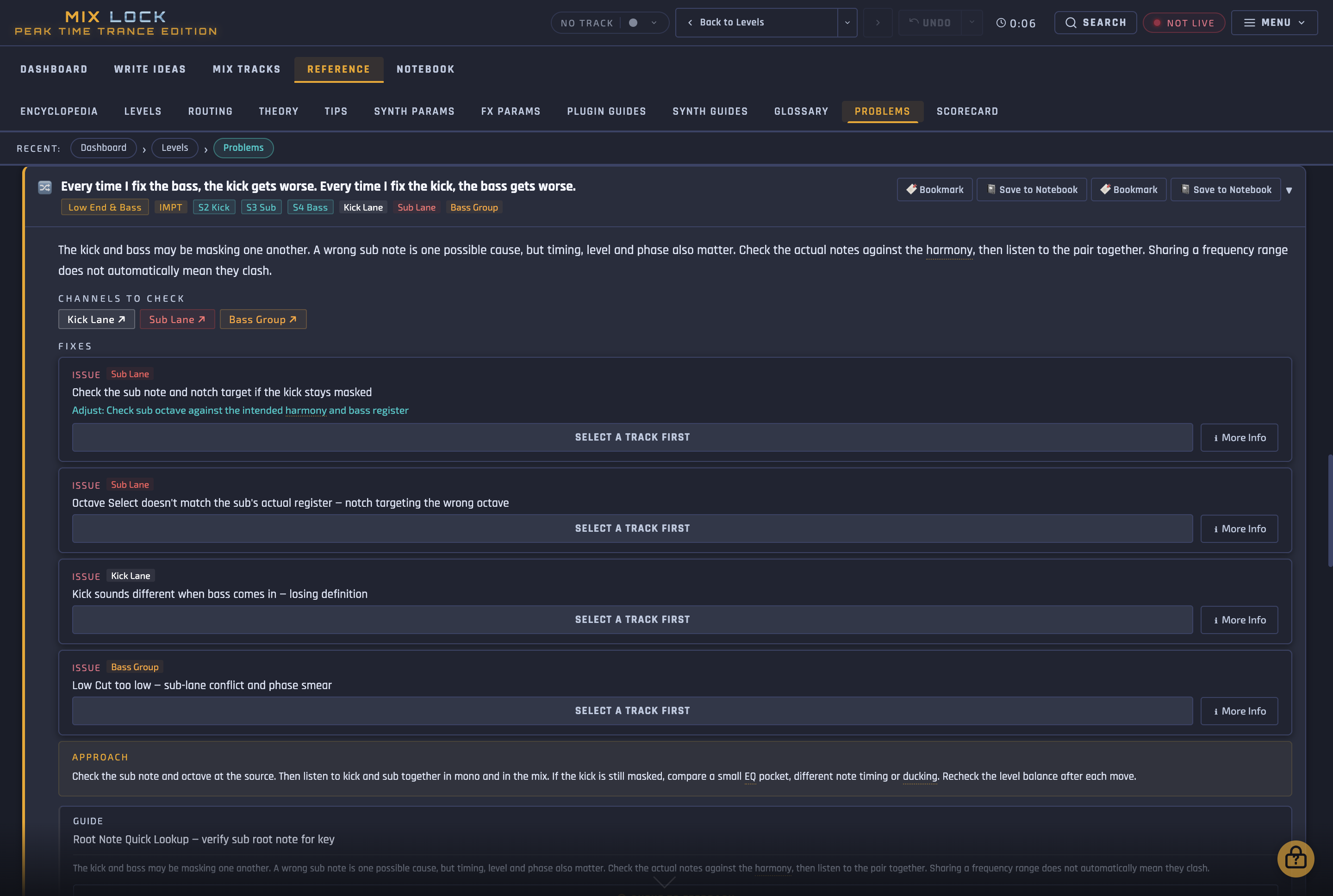
“Every time I fix the bass, the kick gets worse. Every time I fix the kick, the bass gets worse.”
- Channels
- Kick Lane · Sub Lane · Bass Group
What's going on
The kick and bass may be fighting over the same frequencies. Check whether the sub is on the right note and octave, then listen to their timing and levels. A wrong note has to be fixed in the synth or MIDI, because changing levels won't change the note.
Where to start
Check the sub note and octave first, then listen to the pair together. If the kick still sounds buried, check the sub isn't too loud, then adjust the timing and sidechain before trying a small EQ cut in the sub. Recheck the level balance after each change.
Then work the channel
Each problem links through to its channel in the Encyclopedia, which explains every control on the template's rack for the value you've set it to. Here's one control on the Sub Lane, in brief.
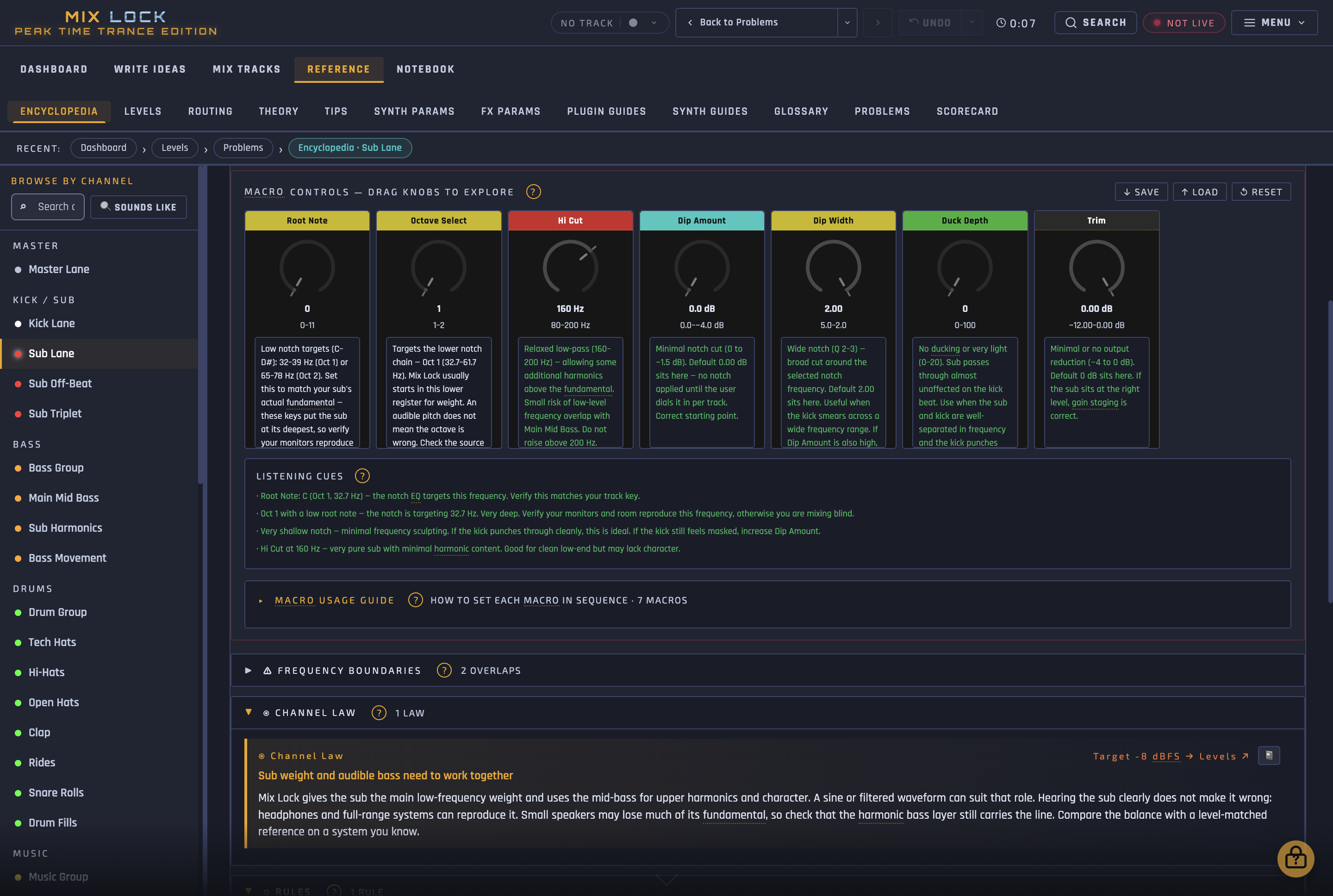
How big should the EQ cut on the Sub Lane be?
- Control
- Dip Amount
- 0 to −1.5 dB: Little or no cut. Leave it here until you've confirmed the sub's note.
- −1.5 to −3 dB: A moderate cut to try when the kick needs more space. Compare with the cut switched off, and keep the sub full.
- −3 to −4 dB: A stronger cut for a persistent clash. Use it only if the comparison sounds better, and back off if the sub turns hollow.

What this guide leaves out
The full version goes much further on these two channels:
- The kick and sub problems covered in Mix Lock, with likely causes and where to start
- A lookup table from each note and octave to its frequency, for setting the Sub Lane's EQ cut
- Guidance for each position of all 13 kick and sub controls
- Level targets for every channel in the template, relative to the kick
Just the kick and sub racks
If you only want the processing from this guide, the Kick Lane and Sub Lane racks are sold on their own as Ableton .adg files, with the same macro controls and calibration as the Mix Lock template. Both are already in the template, so you don't need them if you get the full version.
- Kick Lane rack: subsonic high-pass, mono below 120 Hz and six macros for the kick's punch, bite, density and top end.
- Sub Lane rack: per-note notch, sidechain ducker and mono below 120 Hz, with seven macros.
This is the short version
Mix Lock walks your whole low end like this.
Mix Lock covers every channel in the template and every control on it, and traces the problem you're hearing back to where it starts. It explains the reasoning and you make the changes. Try the app free for 72 hours with no card needed. The 39-track peak-time Ableton template comes with the full version.
Or buy it outright: £45, lifetime licence →